Our Favorite ABC iPad Apps & How We Use Them

Alphabet Apps

We have used our iPad in our homeschool for years, but just recently I got very intentional with the use.  I realized how many awesome ABC apps I had that I wasn’t using enough with Ladybug {currently age 4}.  She wasn’t choosing them as much during her free time, so I decided to incorporate them into her home preschool time with me. 

{disclosure ~ some of the links below are affiliate links}

I am a very forgetful mom without a printable or a list.  Because of my forgetfulness, I made a printable so I wouldn’t forget which apps I wanted her to use each week!  I made the printable to fit in baseball card holders so I could easily keep the little cards together and visible. I turn all of the cards face up at the beginning of a letter week{s} and as we use each one, I flip the cards over so I don’t forget! Currently we are actively using 6 of our favorites, I will rotate these out occasionally as she loses interest in any.

Alphabet Apps

So far this method has worked beautifully and she is visiting these apps with me daily and enjoying them immensely!

I only selected apps that can isolate each letter.  For example, I love the app Alien Buddies, but it works on an entire ABC section, all mixed up.  I can’t just isolate the letter we are working on.  She plays these types of apps during her free “iPad school apps” time. With each of the apps I chose listed below, you can easily just work on a specific letter at a time.

Which apps did I chose?

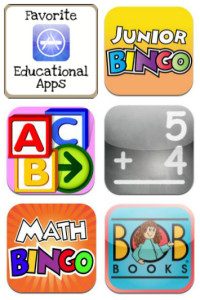
  1. ABCs of God {1.99}
  2. Letter School {2.99}
  3. Letter of the Day {1.99}
  4. Alpha Tots {.99, but it is FREE right now, so grab it quickly}
  5. Little Writer {free}
  6. Starfall {2.99}
  7. BitsBoard {free}
  8. Wee Sing ABC {2.99}
  9. ABC Wildlife {2.99} there are more versions in this series, we just have this one
  10. Prices shown above are current as of May 2013. 

As you will see, all but 2 are paid apps, most of which I have actually gotten free though, when they were marked down!  I did pay for a few {Letter School, ABCs of God, Starfall} but I follow temporarily free apps like a hawk and snag them when I can.  Remember, I always share the best freebies on my Facebook page and many of the deals are time sensitive, so be sure to join me there if you are interested!  I share how I find free apps here!

I had to incorporate this into her Preschool Workboxes {again, so I wouldn’t forget my plan}, so I just put a card in one of her boxes each day and when we get to that box, we grab the iPad and find our current letter on that app and enjoy learning together!

Alphabet Apps

I do allow her to explore after we work together, as sometimes when we open a certain app, she is intrigued and wants to continue exploring other letters.  I do not allow her to move out of the particular app that was “assigned” to her however.  She has plenty of free time to explore other apps during other times of the day.

Below you can see her using Alpha Tots on the left and ABCs of God on the right.

Alphabet Apps -Alpha Tots Alphabet Apps - ABCs of God 

I am sharing my printable in case anyone wants to use it!  I printed mine on cardstock, laminated it, then cut the cards out.  I keep ours in these baseball card holders.  Each night as I set up her workboxes, I just throw a card in one of the boxes ~ so easy and helps my forgetful mommy brain so much!

If you have different apps, I did include a blank page with just the grid lines.  I figured you could write/draw, or even print your own apps and glue/tape them on, then laminate.

~> Download Alphabet Apps Printable Here <~


Looking for my other iPad posts

Favorite Homeschool Apps  Free-Apps  Favorite Apps 

Apple Apps Free Today


Free Apps

I get asked a lot about how I find the free apps.  I have a few methods and it is just a part of my routine now to check these things.  First, I use App Shopper, you can read about App Shopper here on my blog.  For example, here is the price history for Stella and Sam, you can see how great of a deal this freebie is, as it hasn’t been free since Sept 2011!  imageApp Shopper is my go to source for finding the price drops, I have all of the apps I own loaded in so I can notify you of price drops on apps I love.  I also have a wishlist so I will see notifications of price drops!

I also use an app called Apps Gone Free, occasionally they have kid friendly apps in there!

I also follow the app companies on Facebook, so their freebie alerts show up in my stream, they often will giveaway codes on their FB pages {those go fast though}.  A sampling of who I follow: Spinlight Studio, Apps by Auryn, OM Books, Toca Boca, L’Escapadou, Ellie’s Games, Duck Duck Moose, Ruckus Media Group.

I follow General App sites on Facebook too: Moms with Apps, iPhone Mom, Smart Apps for Kids, Fun Educational Apps, are a few.

If I find a freebie via another site, I always give a shout out to who posted it first that I saw in my FB stream, I highly recommend doing this if you find and share freebies too!

If you don’t want to do all that I do, feel free to follow me on Facebook and subscribe to my blog {I normally share app find on FB, but if I find a few I will put them in a post like this}, I always try to notify my readers of any freebies I find!

Educational iPad Apps ~ Part 2

Favorite Homeschool Apps


We have had an iPad 2 for over 6 months now and continue to love using it for school.  I have shared our favorite apps for education and will be adding more of our favorite apps here in this post!

See more of our favorite educational iPad apps here!!!

image

All links are affiliate links, so if you purchase any apps using these links, I will get a tiny percentage-thank you!  The apps are sorted {loosely} by the ages I would recommend introducing the apps-youngest to oldest.  Always give the free version a try {if there is one} and come back to purchase if your child loves it!  I am not writing detailed descriptions for all, but know that I will ONLY put apps my kids and I truly enjoy on this list.  Prices are obviously subject to change based on when you are reading this!


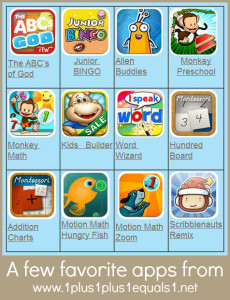
imageThe ABC’s of God 

image

Junior
BINGO

imageAlien Buddies  image

Monkey Preschool

imageMonkey  Math image
Kids   Builder
imageWord  Wizard imageHundred Board
image
Addition Charts
imageMotion Math Hungry Fish imageMotion Math Zoom

image

Scribblenauts Remix

  • The ABC’s of God {1.99}  This is our most recent purchase and a new family favorite.  I learned after I purchased it that the creator is in training to be a missionary also {along with his family}.  The app is so wonderful, I highly recommend it for ages Ladybug on up.  Pac at age 9 even likes it!
  • Junior BINGO {.99}  We LOVE Word BINGO and Math BINGO but they were too advanced for Ladybug, she can play this one now and loves it.  Krash plays it too. Junior works on number ID, letter ID, colors and shapes.
  • Alien Buddies {1.99, we got it for free so keep an eye out for price drops}  Ladybug loves this game.  It is simple and educational at the same time.
  • Monkey Preschool {.99}  Ladybug and Krash love this game.  It is well worth the low price tag!
  • Monkey Math {.99}  Ladybug and Krash love this game, which is the math version of Monkey Preschool above.  It is well worth the low price tag!
  • Kids Builder {.99}  Ladybug loves this game featuring shapes, she chooses it a LOT!
  • Word Wizard {2.99}  This is more for use with the child, on its own it is boring for Krash.  I use this along with our All About Reading program for word practice.  It is an awesome teacher-tool.
  • A Montessori Approach to Math ~ Hundred Board {lite: free, full: 2.99}  Simple and wonderful app, using the hundred board.  Krash LOVES this more than I ever thought he would!
  • A Montessori Approach to Math ~ Addition Charts {lite: free, full: 2.99}  Simple and wonderful app, using the hundred board to work on addition facts.  Krash LOVES this more than I ever thought he would, same as the above app!
  • Motion Math Hungry Fish {lite-free, in app option for full: 2.99}  Wonderful app to work on number combinations.  The fish eats his number, but you have to drag bubbles together to make that number {2+1 = a bubble with 3 he can eat it}.  We have the free version for now.
  • Motion Math Zoom {lite-free, in app option for full: 3.99}  This app is awesome, Pac is begging me to buy the full version.  You have to try it yourself for free to see what it is and how cool it is.  It works on place value in an incredibly unique way.  I may have to spring for the full soon!
  • Scribblenauts Remix {.99 currently, regular price is higher}  We have this game for PacMan’s DS and he loves it.  When I saw it on sale for .99 I bought it for him.  I have played it myself for hours!!!  Definitely a family favorite amongst the older crowd.

Ladybug also has a few books she enjoys and chooses often: Once Upon a Potty, Elmer and Rose, and Dr. Seuss ABC. I am hoping to build up our digital book collection over time!


If you like purchasing apps from your device but still want to support by using an affiliate link, the best thing to do is purchase a gift card and load it into your account, then you can make your purchases from your balance!  That’s what we do!

Apple iTunes


Since writing the first post, we have switched cases.  The first case I chose was with MOMMY in mind and it didn’t hold up to 3 kids and daily use.  We now have a Trident Kraken II case and love it.  It isn’t beautiful by Mommy-standards, but it keeps the gadget safe so I love it.

IMG_7757


You can read my SquareTrade Warranty review here, since unfortunately we had to use it.  In a nutshell, it was an easy process and I highly recommend SquareTrade. {yes that is an affiliate link, so I thank you in advance if you buy one through my link!!!}


We use AppShopper to keep up with price drops on apps, you can read more about that here!

image


Don’t have an Apple product?  Be sure to search my recommended apps in Amazon’s Android App Market. My husband has the Kindle Fire now and it is wonderful but a bit difficult for Ladybug and Krash to use, I like the iPad much better for them.  Pac likes either.image


OK, your turn!!!     Please leave the names of any apps your kids love in the comments section below!

AppShopper…wow!

While reading a magazine today, I came across a free app that has changed how I find apps!  AppShopper is amazing!  Go get it if you use an iPod, Phone or Pad, it’s free!

image

It tracks prices of apps and alerts you if the price drops!  It also shows you price history for particular apps so you can see trends and what price you should wait for if you want to purchase something.  Here’s one example of an app I want and have on my wish list in AppShopper; Bugs and Buttons.  Right now it is listed at $2.99 but I can see that it was .99 and may go back down again so I will wait for a notification!

imageThis is a screen shot from the web version of  AppShopper, you can login on your device or on your computer using the same login info.

Here is another good example…image

We have the free version of Miss Spider’s Tea Party and Ladybug LOVES it but I am not paying $4.99 for it.  I saw that they have the bedtime version on sale for .99 so I bought it for her {she was so giggly and excited when I showed her!}!

I had a blast loading up my wish list and getting some free apps today.  I can’t believe I had no clue this amazing tool even existed! Another COOL feature, you can publicly share your lists to easily share apps you own and your ratings for them, as well as your wish list! I am not using the apps I own feature yet, but here is my wish list: http://appshopper.com/user/1plus1plus1/wishlist for you to see!  Many on that list I am just waiting to see if they ever go free, as I won’t pay for them.  Some I am just waiting for a price drop.   If you set up an AppShopper account, will you share links to your lists below in my comments section?  I always love to see app ideas!

As for apps, I am working on an Educational iPad Appspart 2 and hope to have it complete with lists of our new favorites soon!  For now you can browse through the current list of favorite ipad apps for kids.image

If you are looking for a warranty or iPad case, you can see my SquareTrade Warranty review, as well as info about the new iPad case we purchased.

My SquareTrade Warranty Experience

I got an iPad 2 last spring. We play loads of educational apps on it.  It is a well-loved gadget around here.

IMG_7743

I thought the warranty that the store offered was a bit not-so-good, so I decided to shop around.  Almost bought Apple Care-possibly would have been fine, BUT ended up going with SquareTrade and am so happy I did!

Simple process…

  1. Purchase 3 year warranty for iPad 2, only warranty that I found that covers EVERYTHING.  I bought my iPad 2 on 5/25 and then purchased my warranty on 6/6.  You have 90 days from the purchase price.
  2. Scan and email copy of my original receipt…they keep it on file in case I lose it.
  3. Wait for iPad 2 to break, HIGHLY possible with 3 young kids who love it.
  4. Fast forward  several months – iPad 2 screen cracks when dropped.  Woops.
  5. File warranty claim, receive email from Square Trade within hours. Very fast.  They tell me it can be repaired and they will send me supplies to ship it to them.
  6. Fed Ex 2 Day Air Box is Fed Ex’d to me, with simple instructions on how to prepare and send my iPad to them to be fixed.
  7. I dilly-dally and don’t send it off right away since the iPad was still working and I love it and just couldn’t part with it.  Finally I did.
  8. Wednesday evening 6:30pm before Thanksgiving, I put it in Fed Ex drop box that has no holiday or weekend pickup.  I close the door and see that they cancelled Friday pick up too…Poor iPad locked away in the drop box until the following MONDAY.  BOO.
  9. But—I get an email from Square Trade ON MONDAY saying they received my package-wow!  Must have went out before Monday, huh?!
  10. Later that day I get an email with an update, and I log on to see a report of the status, here’s a screenshot…image
  11. 11/30/11…I get an email from “Encore Repair Services” with no reference to SquareTrade or my iPad, saying a package has been sent Fed Ex to me and should arrive on or before 12/2 by 7pm.  I assume this is my iPad but am not sure at first.  Log onto SquareTrade to check but don’t see a shipment update. Later that evening I get the email from SquareTrade verifying that it was indeed, MY iPad en route to ME! Yippee!
  12. 12/2/11… Fed Ex delivers the iPad safe and sound to a very happy owner around 11:30am.
  13. I don’t let my children touch it until the next day when our new case {info below} arrives to protect it better than my last case {big mistake getting a pretty-mommy-case instead of one that could actually help protect it from 3 kids!}

So, as you can see the process, was easy and painless and I am VERY pleased with my SquareTrade service and will be buying warranties from them in the future. I was hoping I would never need to use the warranty I purchased but am thankful I did now so that I can share with all of you exactly how the process worked for me.  I tried to find first hand reviews {not tech reviews} and struggled, so now you all have an honest review from someone you “know”. 

If you are looking to purchase a SquareTrade warranty, you can do so through my link below and yes I will get an affiliate kick-back, thanks!!  Gotta love when a company you love has an affiliate program!

Oh, and the new case I decided on…the Trident Kraken II.  I bought it on Amazon, it sometimes says “out of stock” in the main section, but under the “buy it new” section, you can get one cheaper and just pay the shipping, which for me worked out to be just $39.48.  We are all very pleased with this case.  It isn’t what I would choose if it were just for me, but since I share the iPad with 3 kids, this is the best option!  It encases the entire iPad with silicone and then with the hard blue case. 

IMG_7757

PS-SquareTrade sells warranties for just about anything electronic, not just iPads!